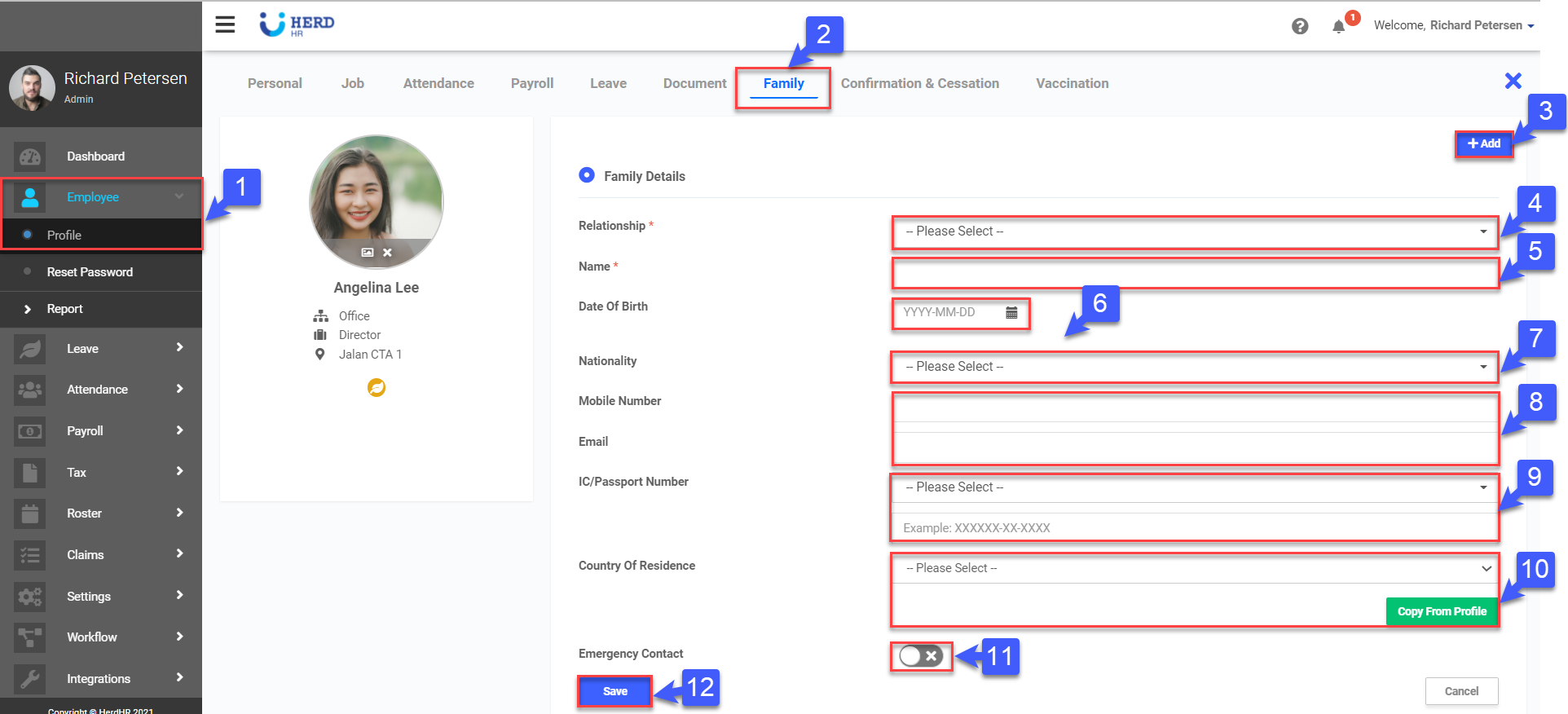
To set up employees’ family contacts after the employee profile has already been created, simply click Employee on the left sidebar menu > click Profile > select the desired Employee > click on the Family tab at the top.
Setting up Employees’ Family Contacts
- Click on Employee > Profile
- Click on Family tab of desired employee.
- Click +Add.
- Select Relationship to the contact from the drop down list. (Required)
- Key in the Name of the contact. (Required)
- Select the Date of Birth.
- Select the Nationality from the drop down list.
- Key in the Mobile Number and email address (optional).
- Select NRIC / FIN / Work Permit Number from the drop down list, then key in the number.
- Select the Country Of Residence from the drop down list. Click Copy From Profile to copy the address of the Employee to this family member.
- Use the toggle switch to select this family member as the Emergency Contact for this Employee.
- Once done, click Save. (*Note: Only one family member can be designated as an Emergency Contact.)